One response for the grid and every dropdown in it
An editable grid is never just its rows. Every dropdown column in it needs an option list: the customers an order can belong to, the statuses it can move through, the regions it can ship to. Those lists come from somewhere, they have to be there before the first cell is edited, and they change while the screen is open.
The Data Router treats those lists the way it treats everything else: as records with a type. One response carries the dataset and every dictionary the screen needs, the router splits it by type, the grid receives its rows, and each dropdown column receives its options. There is no code in between.
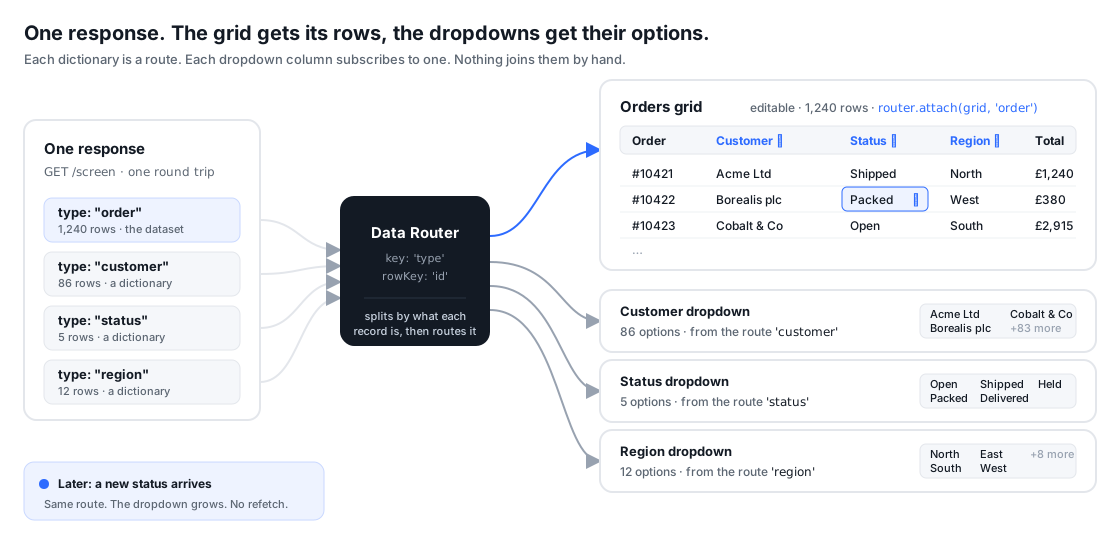
One round trip carries the whole screen
The response is a single list of rows, each one saying what it is:
[
  { "type": "order",    "id": "o-10421", "customer": "c-17", "status": "shipped", "region": "r-3", "total": 1240 },
  { "type": "customer", "id": "c-17", "name": "Acme Ltd" },
  { "type": "status",   "id": "shipped", "label": "Shipped" },
  { "type": "region",   "id": "r-3", "label": "North" }
]
The router is told which property names the type and which names the row:
import { createDataRouter } from '@toclocoinc/lattice-grid/modules/data-router';

const router = createDataRouter({ key: 'type', rowKey: 'id' });
The grid takes one route, each dropdown takes another
The order rows are attached to the grid. The dictionaries are not fetched, mapped or stored anywhere by hand: each dropdown column names the route it wants, and the option list is that route.
const grid = createGrid(el, {
  rowKey: 'id',
  columns: [
    { id: 'id', header: 'Order' },
    { id: 'customer', header: 'Customer', type: 'lookup',
      lookup: { options: { router, predicate: 'customer', map: (r) => ({ id: r.id, label: r.name }) } } },
    { id: 'status', header: 'Status', type: 'lookup',
      lookup: { options: { router, predicate: 'status' } } },
    { id: 'region', header: 'Region', type: 'lookup',
      lookup: { options: { router, predicate: 'region' } } },
    { id: 'total', header: 'Total', type: 'number', format: { style: 'currency', currency: 'GBP' } },
  ],
});

router.attach(grid, 'order');
router.load(await (await fetch('/screen')).json());
A status row already has id and label, so it is used as the option as
it stands. A customer row calls its label name, so a one-line map says
so. That is the entire wiring for three dropdowns.
Dictionaries change, and the dropdowns follow
Option lists are live data. A new status is added, a customer is renamed, a region is retired. Each of those arrives as one more record on the same feed, and the router delivers it down the route the dropdown is already listening to:
socket.onmessage = (m) => router.apply(JSON.parse(m.data));
// [{ op: 'upsert', row: { type: 'status', id: 'held', label: 'On hold' } }]
The option dictionary updates in one pass, every cell that shows that value
repaints once, and an editor that is open on that column shows the new
option without being closed and reopened. A record the route removes takes
its option with it, and any cell still holding that value is shown through
the column’s unknownLabel rule and reported once.
A dictionary that lives somewhere else entirely still fits: a column can
keep a static list or a loader function, and grid.columns.refreshLookup()
brings it up to date on demand. The router path is the one to reach for when
the options belong to the same data the grid shows.
What you do not write
The pieces this replaces are the ones nobody enjoys owning:
- one fetch per dictionary, sequenced so the lists exist before the rows render
- an options registry keyed by column, with the id-to-label mapping for each
- refresh code that knows which columns depend on which list
- a repaint after every refresh, and a way to update an open editor
Each of those is a place where the screen and the data can drift apart. With one response and one router, the rows and the options are the same data, and they arrive and change together.
The same route, wherever it is needed
A route is not owned by the column that reads it. The customer route that feeds the dropdown can also feed a customers grid on the same screen, a KPI tile counting them, or a headless grid behind a chart, all from the same response and the same keyed diffs. That is the Data Router’s job in one sentence: one feed in, every view of it kept in step.
The router API is in the Data Router reference,
and the option-list shape is documented under lookup.options in the
column reference.